
Parts used:
- Samsung SATA Interface Lightscribe DVD Burner -
Model SH-S183L 18x DVD+/-RW Dual Layer 2 Mb Buffer
(black, 5.25 in. bay) - Lite-On SATA Interface Combo CD Burner/DVD Reader -
Model SHC-52S7K 52x32x52x16 CD RW/DVD 1.5 Mb Buffer
(black, 5.25 in. bay) - Sony Floppy Drive - 1.44 Mb (black, 3.5 in. bay)
- Thermaltake Hardcano 12SE Fan Controller - (black, 5.25 in. bay)
- Lian Li Mini Switch Panel -
(aluminum base, black rocker switches, 3.5 in. bay)
To install these bay devices, the front cover of the Lian Li case pops off. All of the devices except the rocker switch panel are mounted with standard mounting screws, Lian Li supplies plenty with the case. The rocker switch panel, since it is made by Lian Li for their cases, simply snaps in, it is held very securely in place -- there are 3 alignment tabs to secure it on each side of the mounting bracket.
The DVD Burner includes Lightscribe technology. This allows you to "burn" black/white designs and labels directly on a CD or DVD. If you have a Lightscribe drive you need to install a driver for it. There are drivers and even a free labeling program at lightscribe.com.
At this step in putting together the gaming PC I only mounted the Thermaltake fan controller and the Lian Li mini switch bus. I will explain how I wired them later. They weren't needed for the first "power on" test of the PC so I didn't wire them until later when I knew everything else was working. The intention is to use the fan controller to monitor case temperatures and to control the four (4) case fans. The mini switch panel is to allow turning case light(s) on and off.
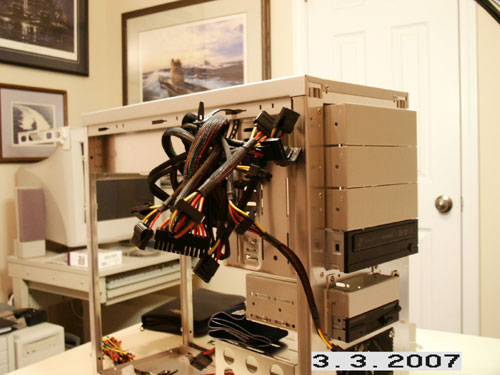
Starting to install the bay devices.
Mrs. C. has dinner ready - can't stop building the PC!
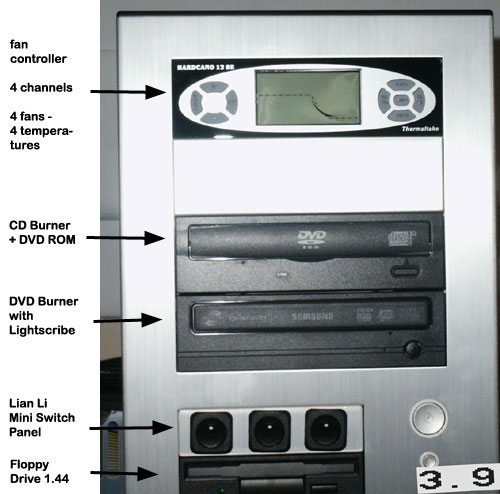
Bay devices labeled, front cover on.
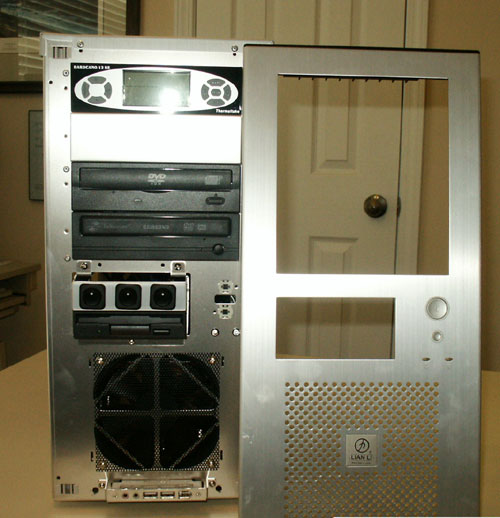
All bay devices in place, front cover off.